Ver.18.06.2026
Location: href: |
|
|
It's FOSS. This small piece of software evolved for practical (commercial) use over a decade ago (see history).
It can also serve as an example for acquiring skills in Linux, Apache, and PHP.
Dig into your webserver and PHP, mainly as
hosted
service, but also on premise.
Goto Small-File-Depot.cu.ma/depot
hosted free @ https://GoogieHost.com/ with 1000 MB space.
Small refers to the size of the PHP-script with 400 lines incl. comments, not on the handled files.
Large files are possible, related to the apache/PHP configuration.
ToDo - organize: cfg.ini $email_owner, $ttl ON/off in box-open box-deep box-public |
Key features: * Up,Dn,Rm in flat directory, no subdirs * Traceability of actions with logfile * Secure webserver manages .htaccess * HTML5, PHP and JavaScript, no CSS |
Introduction - Small-File-Depot, fast and secure file transfer and sharing, secure storage, flavours and screenshots
Small-File-Depot, fast and secure file transfer and sharing, secure storage, flavours and screenshots
Use Case, Flavour
depots, groups, boxes
.htApache index.php
AccCtl Dir Log Act
dep-email i x x UDR
grp-share s x x UDR
grp-indiv i x x UDR
box-public - x x UDR
box-open - x x Dn
box-deep - - - UDR
Installation: Get small-file-depot.zip, extract and transfer to your webserver (Apache2).
|
A small directory listing implemented as an index.php file with three actions (Up, Dn, Rm)
can be configured into seven variants by combining it with web server access controls (Apache2, .htaccess, .htpasswd)
and toggling the features [ AccCtl Dir Log Act(Up,Dn,Rm) ] AccessControl, DirectoryListing, Logging and the three actions ON/off.
These variations allow for the implementation of data sinks or data sources, depending on requirements.
Use Cases Every individual File-Depot /dep-domain.TLD_at_eMail/ exchanges data with the deputy.
The user themselves create their account (try depot.create.php) with a double opt in process.
Group exists in two flavours /grp-share/ and /grp-indiv/ - they differ by share~d account or indiv~idually accounts.
Up to now these accounts are managed manually by editing the lines in .htpasswd.
Boxes like /box-public/ /box-open/ /box-deep/ /box-dead/.htpasswd) and they differ in DirectoryListing and Actions.
Logging for traceability is the key feature of this index.php, besides KISS.
A conspirative /box-dead/index.php,
This might be legally risky and is not recommended.
Technical keywords: It is a simple file storage system hosted on one's own familiar web server; consequently, files are stored unencrypted. Data transmission is secured via SSL; the user interface avoids CSS (KISS) and relies solely on HTML, JavaScript, and PHP, with no database (KISS, using only flat files). The web administrator has (and requires) access via SSH/SCP or FTP.
Consider TimeToLife when fill the directory via FTP (MDTM).
|
Ein kleines DirectoryListing als index.php mit drei Aktionen (Up,Dn,Rm)
wird in Kombination mit der Zugriffssteuerung des Webservers (Apache2, .htaccess .htpasswb ) zu sieben Varianten,
indem die Features [ AccCtl Dir Log Act(Up,Dn,Rm) ] AccessControl, DirectoryListing, Logging und drei Aktionen ON/off gestellt werden.
Mit diesen Variationen können Datensenken (data sink) oder Datenquellen (data source) abgebildet werden, je nach Bedarf.
Anwendungsbeispiel Das Ablageverzeichnis eines Netzwerkscanners für "Scan to FTP" oder "Scan to SMB" ist ein Anwendungsfall mit gemeinsamen Credentials grp-share auf einem öffentlichem Webserver oder im LAN eine box-public ohne Anmeldung. Der Abholer löscht die Dateien, das script nach 31 Tagen (TimeToLife, $ttl).
SSH/SCP,FTP.
Beachte TimeToLife wenn das Directory über FTP (MDTM) befüllt wird.
|
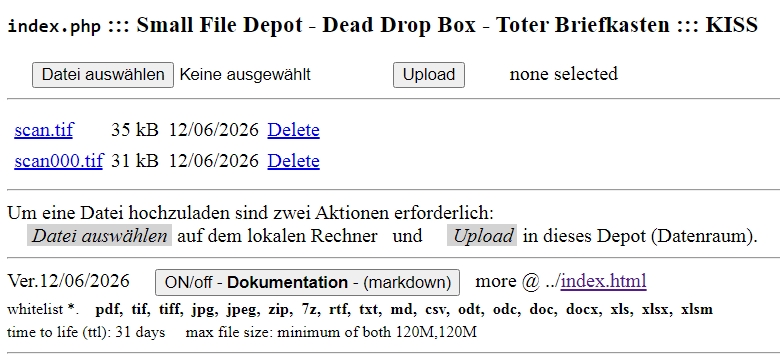
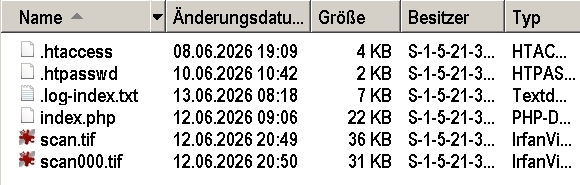
Details - Use Case, Flavour
/depot.create.php
/depot.remove.php and archive .log-index.txt
/dep-email/
       AccCtl Dir Log Act
dep-email  i   x   x  UDR
    .htApache  index.php
 durch create.php erzeugt
/depot.create.php
your username*) and password with your email-address.
Also create a new password for an existing account.
*) Avoid German umlauts, special characters and spaces. |
Small File Depot - Data Sink | Small File Depot - Datensenke |
|---|---|---|
Create a personalised file depot,
to exchange files (Upload,Download,Remove) with the webserver-admin resp. deputy,
reliable and comfortable, without the disadvantage of sending eMail with attachements (postcards with sizelimits).
Avoid German umlauts, special characters and spaces.
You can also create a new password for an existing account (email address and username).
After your repository (depot) has been created, you will receive an email containing your username and the link to your depot.
A second email will follow with a confirmation link to depot.double.php that includes your email address and the token (DOI).
# Comments in the .htpasswd log the changes.
Of course you can share the password with your relatives or friends and use the depot as grp-share, to avoid your own webserver.
The deputy is a general account (depot-admin) with access to all depots. "dep-adm" is the password stored encrypted in .htpasswd and inactive, this must be changed in your installation.
The workflow (data sink) is smoother when you organize access to all depots via SCP/FTP, i.e. FileZilla.
|
Erstellen Sie ein personalisiertes Depot,
zum Austausch von Dateien (Upload,Download,Remove) mit dem Webserver-Admin bzw. deputy),
zuverlässig und komfortabel, ohne die Nachteile von eMails mit Anhängen (Postkarten mit Größenbeschränkung).
Umlaute und Sonderzeichen sind zu vermeiden.
Ebenso erstellen Sie ein neues Passwort für einen existierenden Account (E-Mail-Adresse und Benutzername).
Nachdem Ihr Repository (Depot) erstellt wurde, erhalten Sie eine E-Mail mit Ihrem Benutzernamen und dem Link zu Ihrem Depot.
Es folgt eine zweite E-Mail mit einem Bestätigungslink zu depot.double.php, der Ihre E-Mail-Adresse und den Token (DOI) enthält.
# Kommentare in .htpasswd loggen die Veränderungen.
Natürlich können Sie das Passwort an Verwandte oder Freunde weitergeben und das Depot als grp-share nutzen, um den eigenen Webserver zu vermeiden.
Der deputy ist ein Generalaccount (depot-admin) und erhält Zugriff auf alle Depots via .htpasswd.
"dep-adm" ist das in .htpasswd verschlüsselt gespeicherte Passwort und inaktiv, das muss in ihrer Installation geändert werden.
The workflow is smoother when you have access to all depots via SCP/FTP, i.e. FileZilla.
Der Arbeitsablauf (Datensenke) gestaltet sich reibungsloser, wenn Sie über SCP/FTP, z.B. FileZilla, Zugriff auf alle Depots haben.
|
|
|
/grp-share/ /grp-indiv/
       AccCtl Dir Log Act
grp-share  s   x   x  UDR
grp-indiv  i   x   x  UDR
    .htApache  index.php
     manuell   kopieren
|
Group File Box - Data Exchange | Gruppenbriefkasten - Datenaustausch |
with access control in two flavours for Upload,Download,Remove,
wheather jointly account:password /grp-share or individual accounts /grp-indiv~idually.
A user head is prepared with the encrypted password "grp-adm" and has access to all groups.
Individual accounts you must install manually and change the admin password.
|
mit Zugangskontrolle (Gruppenaccount) in zwei Varianten zum Upload,Download,Remove,
entweder ein gemeinsamer Account /grp-share oder einzelne Accounts grp-indiv~idually.
Ein Benutzer namens head ist mit dem verschlüsselten Passwort "grp-adm" eingerichtet und hat auf alle Gruppen Zugriff.
Einzelne Konten müssen Sie manuell einrichten und das Admin-Passwort ändern.
|
|
|
/box-public/ /box-open/
       AccCtl Dir Log Act
box-public -   x   x  UDR
box-open   -   x   x   Dn
    .htApache  index.php
     manuell   kopieren
|
Little Free Library - Data Exchange | Bücherschrank - Datenaustausch |
| without access control as an example like a Little Free Library. Please upload only sample data, no confidential information or ensure you remove everything when finished. |
ohne Zugangskontrolle als Beispiel
wie ein Bücherschrank.
Bitte nur Beispieldaten hochladen, keine vertraulichen Daten bzw. am Ende alles löschen.
|
|
| Open Pickup box - Data Source | Offene Abholbox (Ablageort Haustür) - Datenquelle | |
without access control, only for download (OFF Upload,Remove), $ttl=perpetuity,
i.e. for free/open-source-software (FOSS).
|
ohne Zugangskontrolle, nur zum Download (OFF Upload,Remove), $ttl=perpetuity,
z.B. für Free/Open-Source-Software (FOSS).
|
|
/box-deep/ txt odt
       AccCtl Dir Log Act
box-deep   -   -   -  UDR
box-dead*) -   x   -  UDR
    .htApache  index.php
     entfällt  entfällt
box-dead*) index.php editieren
|
The Locker - Deeplink File Download | Die Packetstation - Direkter Link |
|
with confidential direct access, but without access control, without DirectoryListing, w/o logging,
known as Deeplink File Download of known files.
|
mit vertraulichem Zugriff, aber ohne Zugangskontrolle, ohne DirectoryListing, ohne Logging,
bekannt als Deeplink File Download von bekannten Dateien.
|
|
|
Datenlieferung ::: Data Delivery
::: Deeplink File Download
Was ist eine Abholbox (Locker)? Sind DeepLinks nützlich zur Datenweitergabe oder gefährlicher Datenklau? Derzeit wird das Logging von DeepLinks nicht unterstützt. DeepLinks werden für einmaligen Datenaustausch nur in direkter Kommunikation mit dem Abholer genutzt (try txt odt) und danach gelöscht. Wie können direkte Deeplinks am apache2 geloggt werden? Wie erhält man logging Daten von direkten Deeplinks zum Dateidownload am apache2 ? Es ist kein Bedarf erkennbar. "Ist das Kunst oder kann das weg?" Die Fettecke von Joseph Beuys (1986) |
||
| Dead Drop Box - Please, No Abuse. | Toter Briefkasten - Bitte, Kein Mißbrauch | |
| without access control without logging, an anonymous Dead Drop. |
ohne Zugangskontrolle ohne Logging, ein anonymer toter Briefkasten.
Der digitale tote Briefkasten - Kunstprojekt, Spionage oder volles Risiko?
Der Berliner Medienkünstler Aram Bartholl startete das Projekt im Jahr 2010 in New York.
Mit deinem Webserver kannst jetzt du mitmachen.
TBK sogar bei Spionage mit Logging
Keine Zugriffskontrolle kombiniert mit dem Verzicht auf Logging im Internet fördert den Missbrauch durch fremde Dritte.
|
|
Imprint / Impressum: take one step back - "Digital Abstand halten"
| Common rules for privates concerning data security and laws. | Allg. Regeln für Verbraucher zur Sicherheit von Daten und Gesetze. |
crietria for private websites
data protection (household exception, Art. 2 Abs. 2 lit. c DSGVO) "Double opt in" is voluntary for private data processing. With DOI you confirm your idendity. |
Kriterien für private Webseiten
Datenschutz (Haushaltsausnahme, Art. 2 Abs. 2 lit. c DSGVO) "Double opt in" ist bei privater Datenverarbeitung freiwillig. Mit DOI bestätigen Sie Ihre Identität. Welche Aufzeichnungspflichten hat ein Unternehmer in der digitalen Datenverarbeitung? |
MIME-Types - Accepted files, the whitelist - MIME-Types
*. pdf, tif, tiff, jpg, jpeg, zip, 7z, rtf, txt, md, csv, odt, odc, doc, docx, xls, xlsx, xlsm
|
Whitelist: Aus Sicherheitsgründen werden ausgewählte Dateitypen (MIME) akzeptiert, andere zurückgewiesen. Trotz aller Vorsicht erfolgt die Benutzung auf eigenes Risiko. In der blacklist stehen die abgewiesenen Dateinamen der Scripte. Viele Dateien, ein Projekt, ein ZIP-Archiv!
HTTP-Authentifizierung - Browser neu starten
Bei fehlgeschlagener HTTP-Authentifizierung => den Browser neustarten!
|
The login session ends with closing your browser application (all instances).
You also have to close the browser if the login procedure fails. Ask your IT-consultant or run your own test.
Upload a file (remember the filename) and close the browser. With a new browser start you can not reach the file.
No hotlinking, only bruteforce attack (systematic guess of user:passwd combination) is possible.
|
Die Anmeldesitzung endet mit Schließen der Browser-Anwendung (alle Instanzen).
Auch nach einer fehlerhaften Anmeldeprozedur müssen Sie den Browser beenden. Fragen Sie ihren IT-Fachmann oder testen sie selbst.
Laden sie eine Datei hoch (merken sich den Namen) und schließen den Browser. Mit einem Browser Neustart erreichen sie die Datei nicht mehr.
Kein hotlinking, nur bruteforce attack (systematisches Erraten der user:passwd Kombination) ist möglich.
|
Bei einer fehlgeschlagenen HTTP-Authentifizierung über .htaccess
sendet der Apache-Server den Statuscode \(401\) (Unauthorized).
Es gibt keine direkte Funktion, um die Anmeldung unendlich oft zu wiederholen.
Das Verhalten wird stattdessen vom Browser des Nutzers gesteuert.
Das Browser-Verhalten!
Nach einer bestimmten Anzahl von Fehlversuchen (oft 2 bis 3) brechen die meisten Browser den Vorgang ab
und leiten auf eine Fehlerseite weiter. Der Browser speichert die fehlerhaften Daten im Cache,
sodass beim Neuladen der Seite oft sofort wieder der Fehler erscheint.
Benutzerseitig die Lösung!
Den Browser neustarten. Das Schließen und erneute Öffnen des Browsers leert den Authentifizierungs-Cache.
Damit wird die Schleife im Browser durchbrochen und die erneute Eingabe von Benutzername und Passwort erzwungen.
Security and Webserver - Apache2 (Nginx, Lighttpd)
1. URL Rewriting
2. Password Protection (Authentication)
3. Hotlink Protection / Deny Access
https://medium.com/@noor1yasser9/speed-security-and-scalability-choosing-between-abatch-nginx-and-lighttpd-57dc0e38b548
Security and Apache2 session login - LAMP but without database => LAP follows KISS
Intro or google with the most beneficial link for learning. https://www.feistyduck.com/library/apache-security/online/apachesc-CHP-7.html Chapter 7 Access Control explaining Basic Authentication Using Plaintext Files: The easiest way to add authentication to Apache configuration is to usemod_auth , which is compiled in by default and provides Basic authentication using plaintext password files as authentication source.
Limitation:
Looking up user accounts in plaintext files can be slow, especially when the number of users grows over a couple of hundred.
And Final Access Control Notes: I will mention more Apache directives related to access control.
See also
Chapter 8 Logging and Monitoring
Interesting
The tricky security issue with FollowSymLinks and Apache,
but irrelevant. If you are in doubt, go without.
Other details, like
Directory Listing auf Webserver ist gefährlich
or "Same Origin Policy" (SOP), mentioned at
Wie du deinen Webserver absicherst – Beispiel Apache Webserver or here
Aus Linux-Magazin 07/2018: Wie man einen Apache-Webserver gut und zuverlässig absichert
.htaccess and PHP security is under construction - continuously i.e. check file content fits to extension, [PHP](https://www.php.net/manual/en/function.mime-content-type.php) [mime_content_type](https://www.php.net/manual/en/function.mime-content-type.php#91646) https://medium.com/@citril/advanced-htaccess-file-attacks-part-i-d653567d1ded https://www.ionos.co.uk/digitalguide/hosting/technical-matters/htaccess-tricks/ https://www.syhost.ch/tipps_und_tricks.html?s=Website-PHP-Schutz https://tuxcare.com/de/blog/php-vulnerability/ https://perishablepress.com/stupid-htaccess-tricks/
Security and Nginx einrichten - ToDo
.htaccess in Nginx einrichten Passwortauthentifizierung mit NGINX einrichten Basic HTTP-Authentifizierung mit Nginx https://www.howtoforge.de/anleitung/basic-http-authentifizierung-mit-nginx/ Mit htaccess und htpasswd eine Website mit Passwort schützen - Wartungsmodus, Zugriffsbeschränkung und Alternativenhttps://cosci.de/de/programmieren-de/mit-htaccess-und-htpasswd-eine-website-mit-passwort-schuetzen-wartungsmodus-zugriffsbeschraenkung-und-alternativen/
Security and Lighttpd einrichten - ToDo
> Lighttpd does not support .htaccess files. Instead of distributed configuration files, it uses a single global or vhost configuration file (usually lighttpd.conf). To achieve .htaccess-like functionality (like URL rewriting, redirects, or password protection), you must convert your rules and add them directly to your Lighttpd configuration. google https://www.linux-magazin.de/ausgaben/2021/02/lighttpd-aufsetzen/ https://doc.qt.io/QtAutoDeploymentServer/qtauto-deployment-server-http-server-setup.htmlDocumentation - "Small File Depot" - all files - KISS
"Das Depot" / The Software Components
lines /depot/index.html        a copy of /depot.index.html - you build your own introduction
~650        /depot.index.html  links to the flavours, the script to create accounts (DOI), docu and history (markdown)
~300        /depot.index.php   file actions (Up,Dn,Rm) for the user-directory (account), $cp to udir/index.php
~400        /depot.create.php  create account, udir/.htaccess, prepare /.htpasswd (or single opt in, SOI)
~130        /depot.double.php  link for id check and activate account (user:passwd) in .htaccess (double opt in, DOI)
            /.log-create.txt   logging of (timestamp, IP-address, username) for new created accounts, new passwords
            /.log-index.txt    logging of all actions (Up,Dn,Rm) in the depots and the public boxes
   /depot/dep-domain.tld_at_lastname-surname/   udir is the switched email-address of the user,
   /depot/dep-udir                              username and encrypted password are stored in the .ht-files (hypertext)
apache2     /.htaccess   Require valid-user, Rewrite, prevent: hotlinking, directory listing
            /.htpasswd   for the account (udir) with the username and encrypted password
All these files are in the blacklist, not shown in the flat directory listing, but present.

# check attributes: 755/644 for all incl. /depot !!! chmod chown !!!
$ find depot -type f -exec chmod 644 {} +
$ find depot -type d -exec chmod 755 {} +
// This code is released under GPL 3.0 which is not included
Skizze zum Ablauf "Das Depot" online einrichten ...
                                          1. Initiator (USER) Account ```depot.create.php```
                                             trägt ein: eMail, USERname, Passwort
2. Webserver (apache2/PHP) erzeugt
  - DEPOT-Verzeichnis: domain.TLD_at_eMail
  - copy .htpasswd & .htaccess & index.php
  - mail-1: Link zum Depot und der Username   - mail-1:  Information zum Account
  - mail-2: Bestätigungslink DOI              - mail-2:  Identitfikation, Link anklicken
                                          3. Initiator (USER) Bestätigung ```depot.double.php```
4. Webserver aktiviert den account
  - Passwort in .htpasswd freischalten
                                          5. USER logt sich ein ... Dateien: Up,Dn,Del
History, ToDo+MayBe, Alternatives, Notes - markdown with marked.umd.js
FOSS - Open-Source a GNU General Public License - download
Usage or contributions are welcome, esp. to security on LAP- Linux, Apache, PHP.// This code is released under AGPL 3.0 which is not included GPL / AGPL 3.0
Get a copy as
small-file-depot.zip
at /box-open/
or as Deeplink-File-Download